
Spam emails act as a risk to the organisation. Separate training is provided by the trust regarding cybersecurity.
- When in the Inbox view, take a look at the emails that are there.
- Typically, spam emails will be trying to offer a service, sell a product, or are asking you to open links or attachments. If you identify a spam email, you should block and delete the contact. This will prevent further emails coming through to the inbox, and will also remove any contact and/or company records that have been created when the email was received.
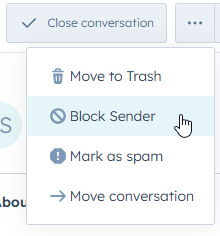
- With the email open, navigate to the three dots next to 'Close Conversation'. Then choose 'Block Sender'.
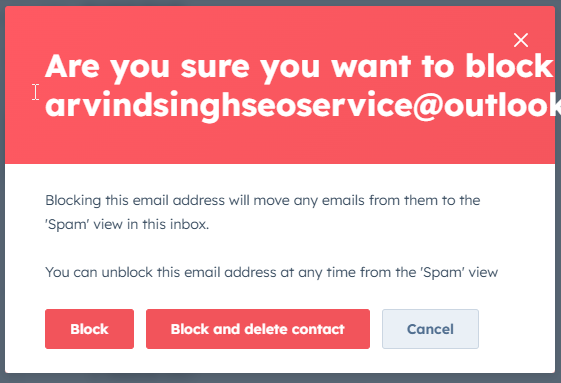
- You will then be presented with a dialogue box. Choose 'Block and delete contact'. This will remove the email from the inbox, and delete any records created as part of the email.
- Repeat this process for any other emails that have arrived in the inbox.
- You may find that you do not get the 'Block and delete contact' option in the dialogue box. This will typically be because the contact has already been deleted from another spam email. In this instance, press 'Block'.